The demo account lets you explore the platform using a demonstration balance. The real account uses real money. Always check which account is selected before placing a trade.
| Demo account | Real account |
|---|---|
| Uses a demonstration balance to simulate trades. | Uses real funds and involves the risk of financial loss. |
| The demonstration balance is not money available for withdrawal. | Withdrawals depend on your available balance and account requirements. |
| Helps you learn the controls; simulated results do not guarantee real results. | Trade results affect the money used. |
Where can I see which account I am using?
- Find the balance and account name at the top of the platform.
- Open Cambio de cuenta (Switch account), the selector next to your balance.
- Check the options Cuenta real (Real account) and Cuenta demo (Demo account).
- After choosing an account, check its name at the top again before trading.
Has your demo balance run out?
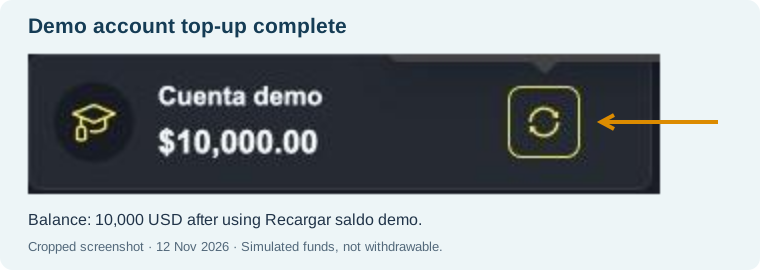
In the selector, the demo account has a Recargar saldo demo (Top up demo balance) control, shown as a circular arrow. You can use this top-up without limits or conditions. Topping up the demo account is not a deposit into your real account.
The amounts in the screenshot are examples of the demonstration balance in the recorded session. They do not represent a prize or funds available for withdrawal.
For real-account withdrawal requirements, see how to request a withdrawal.

For a guided exercise, see how to practise with the demo account.
How do I check that the top-up is complete?
After selecting Recargar saldo demo, check the confirmation and the Cuenta demo balance. In the recorded session, the platform displayed ¡Éxito! ¡Recarga exitosa! (Success! Top-up successful!), and the balance changed from 9,999.62 USD to 10,000.00 USD.
The amount shown is the result of this example. Demo funds remain simulated and cannot be withdrawn. Topping up the demo account does not make a deposit into the real wallet.