
Before requesting a withdrawal: withdrawals are paid in cryptocurrency, carry a 3% fee, and must go to a wallet owned by the person who completed KYC. Check the fee and limits and wallet ownership requirements.
To request a Worbit withdrawal, you need a confirmed email address, approved identity verification (KYC) and Google Authenticator (2FA) enabled. Uploading a document or installing the authenticator app alone does not complete these steps.
If you have not finished yet, see how to verify your identity and how to access and set up Google Authenticator.
Start in your wallet
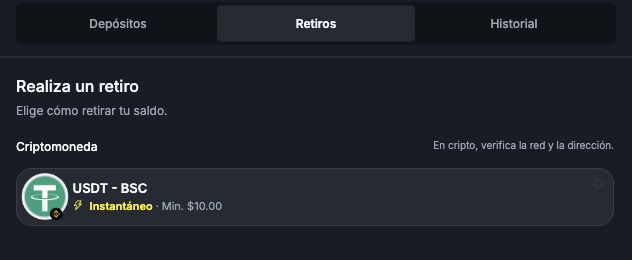
- Open Cartera in the bottom menu of the compact layout, or Billetera in the wider layout. Both mean Wallet.
- Select Retiros (Withdrawals).
- Select USDT - BSC: withdrawals are only available in USDT over the BEP20 (BSC) network.
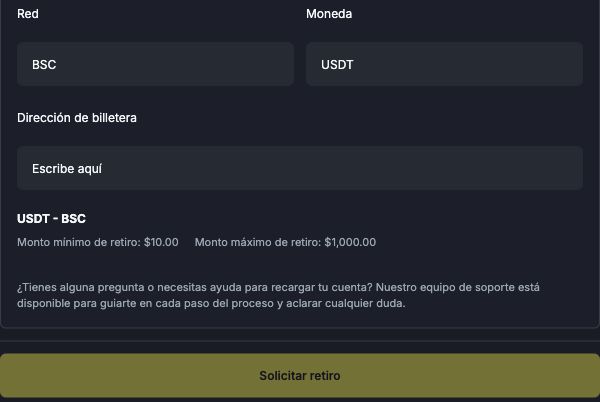
- Enter an amount between 10 and 1,000 USD. The 3% fee is deducted from the requested amount: if you request 100 USD, you receive 97 USD, with no additional network fee.
- Enter the destination details carefully. For USDT - BSC, check Red (Network), Moneda (Currency) and Dirección de billetera (Wallet address).
- Review the amount, method and receiving details before selecting Solicitar retiro (Request withdrawal). Complete any checks the platform displays.
The destination address must support the specified currency and network. Do not replace BSC with another network just because the currency is also called USDT.
After submitting your request
Open Cartera → Historial (Wallet → History) to find the record. Submitting a request does not mean the money has already reached its destination. See how to track your withdrawal.
If the button is unavailable, check your balance, completed fields, limits, email confirmation, KYC approval and 2FA activation. If you still cannot continue, email support@worbit.io.
How does the request affect your balance?
While the withdrawal is pending, the amount has not yet been deducted from your balance. Your balance is debited when the withdrawal is completed; the fee is deducted on approval. Keep enough funds to cover the request: if there is not enough balance to make the withdrawal, it will be cancelled.
If you have an active bonus, you must cancel it before requesting a withdrawal. Cancelling removes the funds and gains in the bonus wallet. If you have already completed the rollover requirement, first check how to transfer released funds so that you do not confuse a transfer with cancellation.
The general approval time is 1 to 5 business days, with benefits depending on your VIP level. After approval, receipt may take longer because of the BSC network. See approval and receipt times.
After transferring released bonus funds
Transferring released funds automatically ends the active bonus and enables withdrawal requests, provided you meet the general account requirements. You do not need to cancel that bonus after the transfer. See how to complete rollover and transfer the funds.