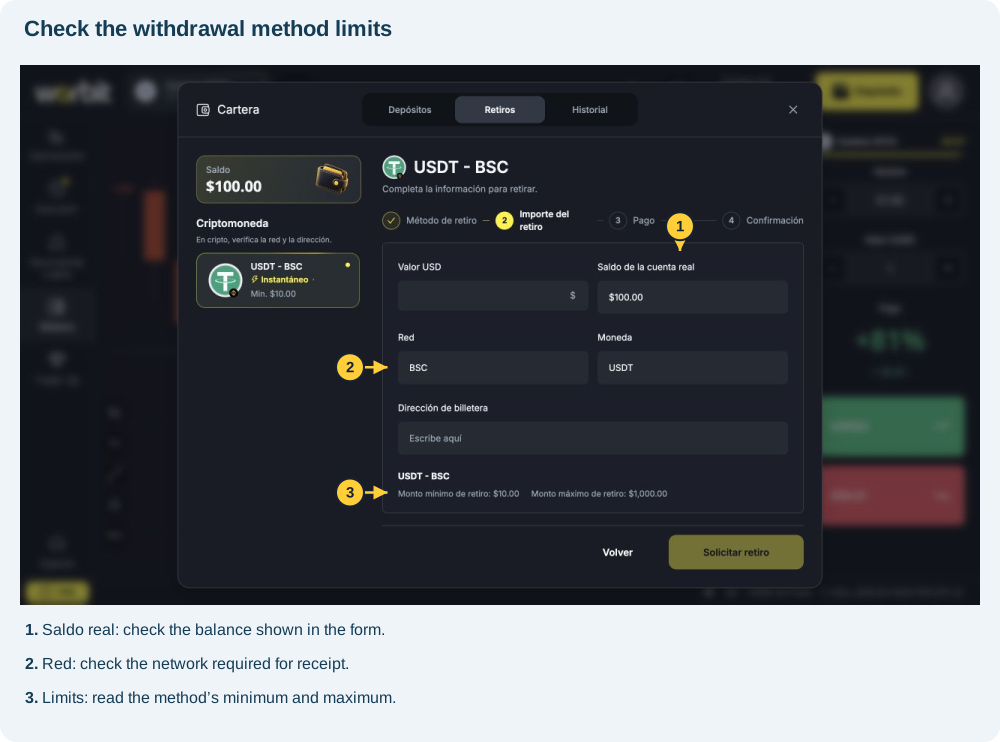
The minimum withdrawal is 10 USD and the maximum is 1,000 USD per request. These amounts are the same for all VIP levels. Withdrawals are made in USDT over the BEP20 (BSC) network.
How does the fee work?
The fee is 3% of the requested amount, deducted from that amount on approval. There is no additional network fee for a Worbit withdrawal.
| You request | 3% fee | You receive |
|---|---|---|
| 10 USD | 0.30 USD | 9.70 USD |
| 100 USD | 3 USD | 97 USD |
| 1,000 USD | 30 USD | 970 USD |
The minimum refers to the requested amount. A request for 10 USD therefore results in receipt of 9.70 USD after the fee.
Where can I check?
- Open Billetera / Cartera → Retiros (Wallet → Withdrawals).
- Select USDT - BSC.
- Check Monto mínimo de retiro (Minimum withdrawal amount), Monto máximo de retiro (Maximum withdrawal amount) and your real balance.
- Review the currency, network and wallet address before submitting.
Do I need to keep the money in my account?
Yes. Your balance is only debited when the withdrawal is completed. A pending request does not mean the money has already left your account. If there is not enough balance to make the withdrawal, the request will be cancelled.
What other requirements apply?
You need a confirmed email address, approved KYC and active Google Authenticator (2FA), a destination wallet you own and enough balance. If you have an active bonus, check the conditions and consequences of cancelling it before withdrawing.
See how to request a withdrawal and how long approval takes.