
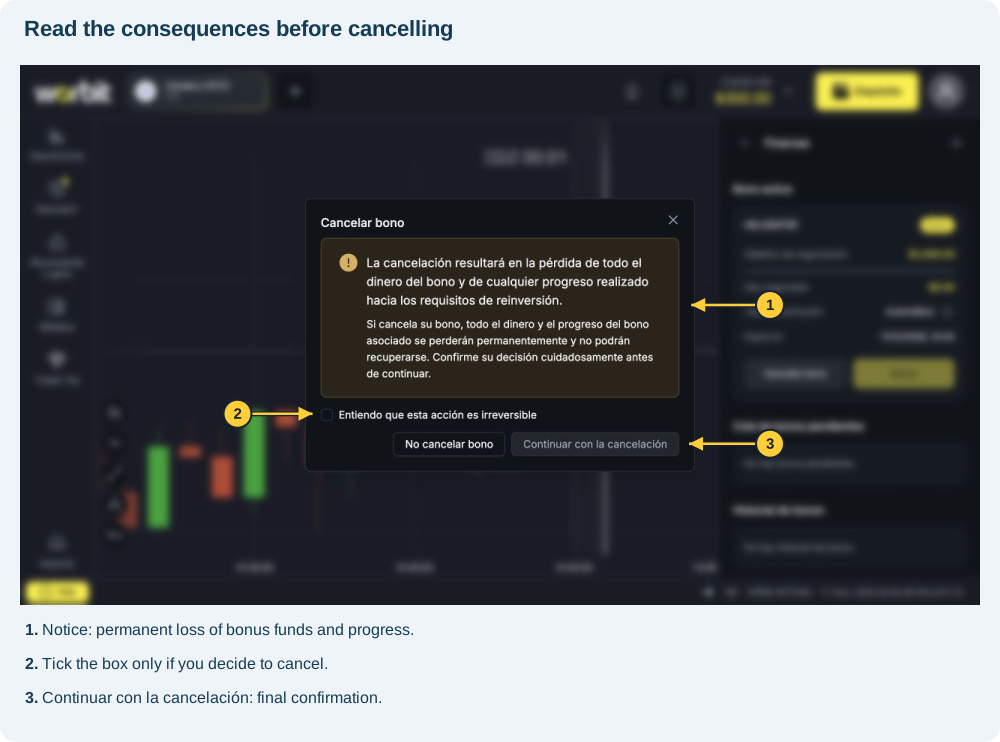
Cancelling a bonus means losing the funds and gains in your bonus wallet. Cancellation also removes progress towards the bonus requirements. The screen states that the loss is permanent and the amounts and progress cannot be recovered.
Open financial details
- Select Cambio de cuenta (Switch account), next to the balance at the top.
- Select Ver detalles (View details) to open Finanzas (Finances).
- Check the separate amounts under Cuenta real (Real account), Bono (Bonus) and Valor total (cuenta real + bono) (Total value: real account + bonus).
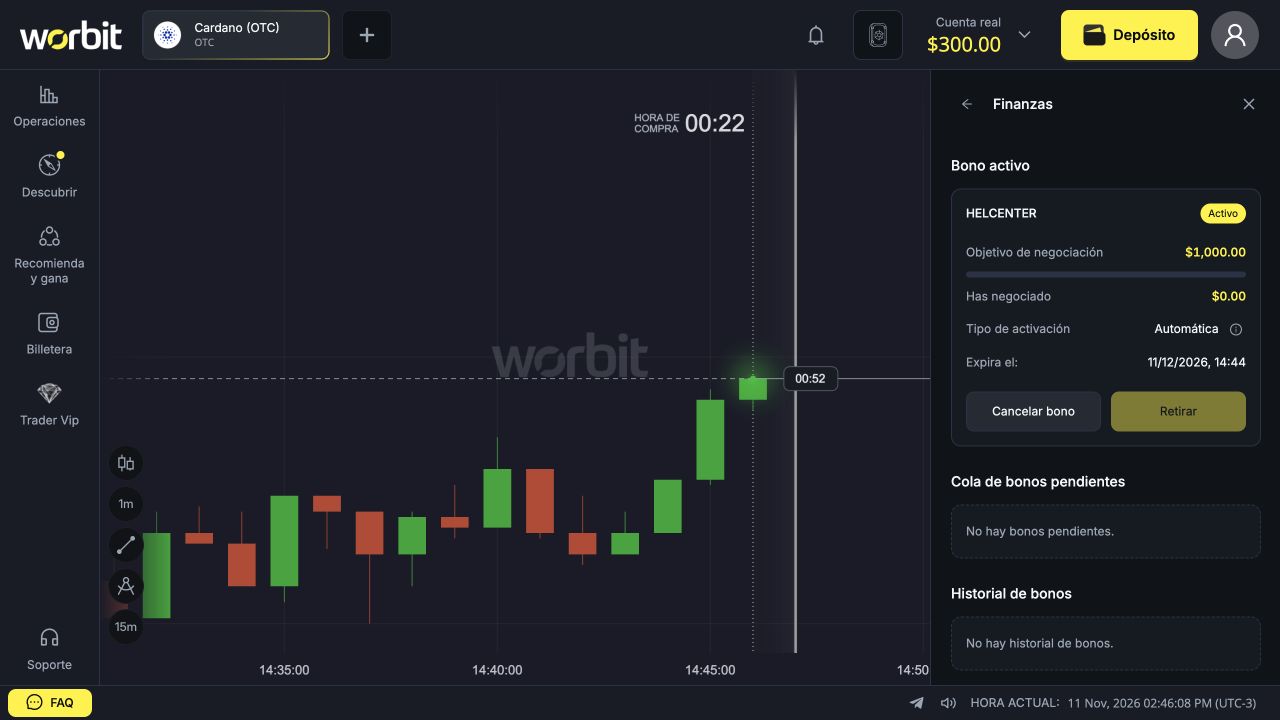
- Under Bono activo (Active bonus), find the bonus card.
The total includes real money and bonus funds. Do not treat it as your available withdrawal balance.
Check the bonus you intend to cancel
On the card, check the name and Activo (Active) status. The screen also shows Objetivo de negociación (required trading volume), Has negociado (volume already traded), activation type and expiry under Expira el (Expires on). These details belong to the displayed promotion; they are not universal conditions.
Open the cancellation notice
- On the bonus card, select Cancelar bono (Cancel bonus).
- Read the notice about permanently losing funds and progress.
- If you want to keep the bonus, select No cancelar bono (Do not cancel bonus).
- If you decide to cancel, tick Entiendo que esta acción es irreversible (I understand that this action is irreversible).
- Select Continuar con la cancelación (Continue with cancellation) to confirm your decision.
Important: opening the notice does not cancel the bonus. In the recorded screen, the continue button remains disabled until you tick the acknowledgement box.
Check the result before requesting a withdrawal
After completing the process, check the message, bonus status and updated balances. If the result is unclear, contact support before repeating the action. Cancelling does not turn bonus wallet funds or gains into real funds.
After cancellation, you can request a withdrawal of your available real balance if you have a confirmed email address, approved KYC and active Google Authenticator and meet the other withdrawal conditions. The lost bonus wallet funds are not part of that withdrawal.
See how to request a withdrawal. If the option remains unavailable, see withdrawal problems.
I cannot find an active bonus or the cancellation button
Check that the panel has finished loading. If there is a balance under Bono but the section says No hay bono activo (No active bonus), report the difference to in-platform support. That message alone is not confirmation of cancellation.
I completed the target. Should I cancel to release the bonus?
Do not use Cancelar bono to transfer released funds: that control removes bonus wallet funds and gains. After completing rollover, transferring the entire balance of that wallet is a manual step. See where to find Retirar and how to check progress.
The deadline depends on the campaign. If rollover is not completed on time or the bonus expires, the entire bonus wallet balance will be cancelled.
After transferring released bonus funds
Transferring released funds automatically ends the active bonus and enables withdrawal requests, provided you meet the general account requirements. You do not need to cancel that bonus after the transfer. See how to complete rollover and transfer the funds.