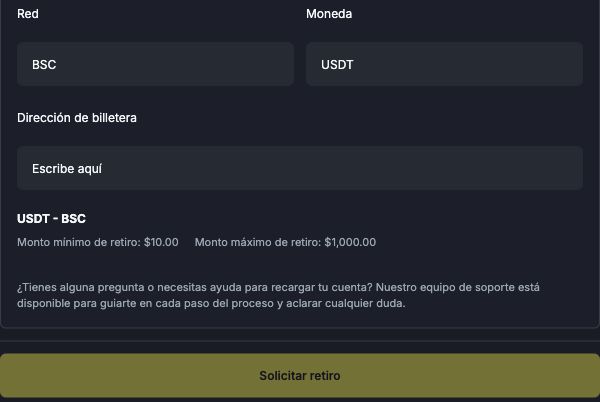
First, identify what happened: you have not been able to submit the request, the request was rejected, or it was submitted and is still in progress. Each situation needs a different check.
I cannot request a withdrawal
Check your email confirmation: it must be confirmed. If you did not receive the message, see how to find the confirmation email. If you have an active bonus, read the cancellation conditions.
- Check KYC. Verification must be approved. Uploading the document is not enough; review can take up to 72 hours. See how to track verification and, if it was rejected, how to correct the document submission.
- Check Google Authenticator. It must be active on your account. If you have lost access, see authenticator recovery.
- Review the amount and required fields. Check your available balance, the method's limits and receiving details. For USDT - BSC, check the currency, network and destination address.
- Read the displayed message. It may explain what needs correcting. If you do not understand it, note the wording so you can ask support.
The request was rejected
Open Cartera → Historial (Wallet → History) and find the request. Check its status and any reason provided. A rejected withdrawal does not necessarily mean your identity document was rejected: check which stage failed before resubmitting information.
Correct only what the notice asks you to. If there is no clear reason, contact support before creating another request. Your balance is only debited when the withdrawal is completed. Do not automatically treat a rejected request as an amount already debited that must be returned. Check the records; if your balance differs, ask support to review the entry. If there is not enough balance to make the withdrawal, the request will be cancelled.
The request was submitted, but the money has not arrived
A request in progress is not, by itself, a rejection. See how to track your withdrawal. Approval on the platform and receipt at the destination are separate stages.
Contact in-platform support
If you are signed in, you can ask for help through the platform's own support chat. In the wider layout, look for Abrir soporte (Open support) or ¿Necesitas ayuda? (Need help?). Explain whether you cannot request a withdrawal, your request was rejected or you are waiting to receive it. See how to access support.
What should I tell support?
In the chat—or by email to support@worbit.io if you cannot access it—provide the date, method, requested amount, status and message displayed. Include the request identifier if there is one. Do not send your password, Google Authenticator codes or recovery key.
After resolving the issue, follow the steps to request a withdrawal.