
Rollover is the trading volume required to release bonus-wallet funds. It is calculated by adding the amounts invested in trades; it is not a profit target. The calculation base is always deposit + bonus. The campaign sets the multiplier and deadline.
How is the target calculated?
The calculation base is always deposit + bonus. Multiply this sum by the rollover factor specified in your campaign:
Required volume = (deposit + bonus) × multiplier.
Example with 55× rollover: a 100 USD deposit + a 100 USD bonus gives a calculation base of 200 USD. The required volume is 55 × (100 + 100) = 11,000 USD. You need to accumulate 11,000 USD in trading volume, not make 11,000 USD in profit. The 55× multiplier illustrates this example; check the multiplier and deadline for your campaign.
Which trades count?
100% of the amount invested in each eligible trade counts, whether win, loss or tie. The calculation uses investment, not payout.
Volume is not balance: it may increase even when a trade reduces funds. Demo money is fictional and should not be used to estimate bonus release.
Counting examples
A 100 USD trade with 85% payout adds 100 USD of volume, not 85 USD, whether it wins, loses or ties.
For a 10,000 USD target, 10 eligible 100 USD trades accumulate 1,000 USD: 10% of the target, not 1,000 USD profit.
Where can I track progress?
- Open Cambio de cuenta (Switch account) beside the balance.
- Select Ver detalles (View details) to open Finanzas (Finances).
- Find your campaign under Bono activo (Active bonus).
- Compare Objetivo de negociación (Trading target) with Has negociado (You have traded).
- Check Expira el (Expires on). Dates and multipliers vary by campaign.
I completed rollover. How do I release funds?
The entire bonus-wallet balance becomes available for manual transfer. Meeting the target does not transfer automatically. Transferring released funds automatically ends the active bonus and allows withdrawal requests subject to general requirements. You do not need to cancel that bonus afterwards.
- Find Retirar (Withdraw) on the bonus card. Here, the button transfers released bonus funds; it does not send cryptocurrency to an external wallet.
- Check it is enabled after meeting the target.
- Read information and any confirmations before transferring.
- Check the response and updated balances before treating it as complete.
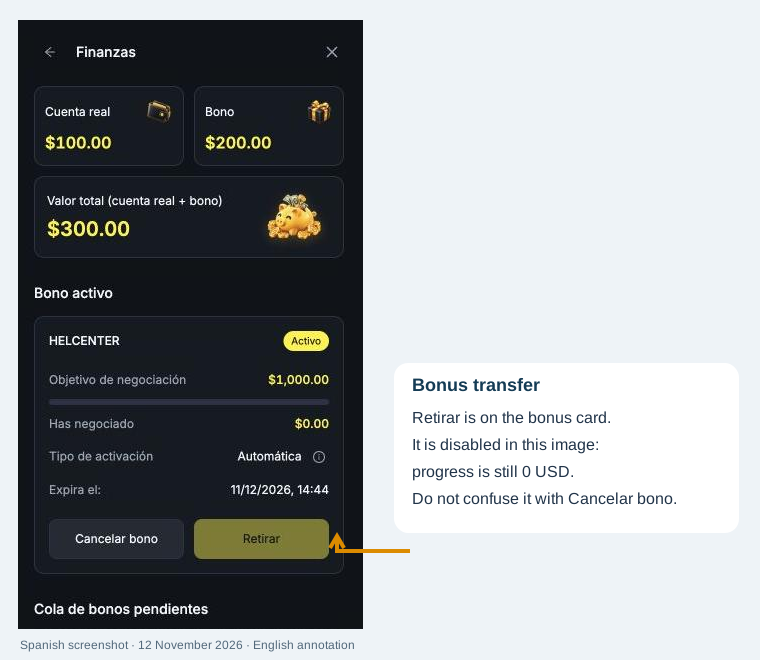
Retirar and Cancelar bono have different effects. Retirar transfers released funds. Cancelar bono (Cancel bonus) removes funds and gains from that wallet. Do not cancel to release an already-completed target.
What if time runs out?
If rollover is not completed in time or the bonus expires, the entire bonus-wallet amount is cancelled. Check validity before activation and while tracking progress.
What about withdrawing to my crypto wallet?
Transferring released funds and withdrawing externally are separate steps. You need confirmed email, approved KYC, active Google Authenticator and sufficient balance. After rollover and manual transfer, the bonus ends automatically and you may request withdrawal subject to general requirements. Cancelling first removes bonus funds and gains. See cancellation consequences and how to withdraw.
If Retirar remains disabled, give support the campaign, target, completed volume and expiry. Do not assume Cancelar bono will fix it without losing funds.