
Available payment methods depend on the country of your account. You may therefore see different options from those in someone else's account or in the screenshots in this article. Always check your own wallet before starting a payment.
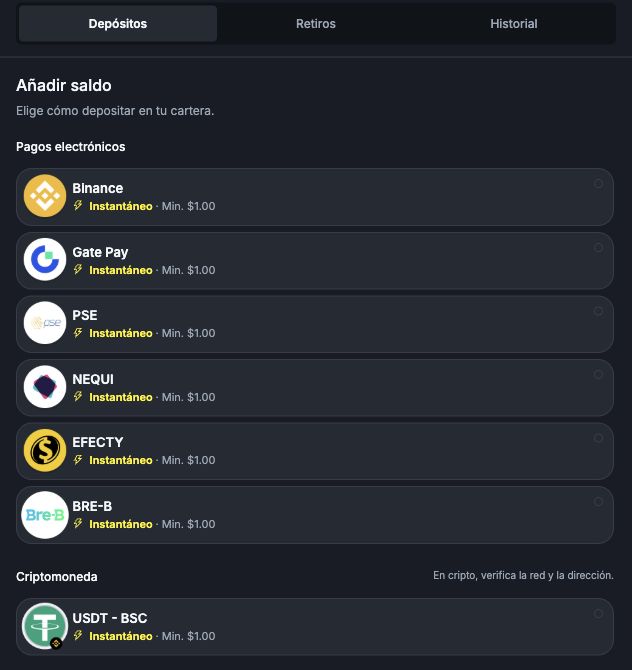
- On the main screen, open Cartera in the bottom menu, or Billetera in the wider layout. Both mean Wallet.
- Select the Depósitos (Deposits) tab.
- Review the methods and the information displayed alongside each option, such as the minimum amount.
Use the options currently displayed in your own account as your reference. Do not send money through a method you saw in a tutorial if it does not appear in your wallet.
I will use cryptocurrency. What should I check?
Check both the currency name and the specified network. For example, USDT - BSC means USDT on the BSC network. Do not use a different network just because the currency name is the same.
If you are unsure which option to use, ask for guidance using ¿Necesitas ayuda? (Need help?) in the wallet or email support@worbit.io before sending money.
Deposit amounts, fees and timing
The minimum deposit is 10 USD. The maximum depends on the payment method; check it on the deposit screen. Deposit fees range from 3% to 7% and are deducted from the amount credited. Conversion for local-currency payments is displayed at checkout, and your Worbit balance is credited in USD. See deposit limits, fees, conversion and what to check before paying.
A deposit may be credited instantly or take up to 72 hours, including delays caused by banking issues. If you paid after the payment request expired, contact support and provide your receipt. Do not make a new payment to try to resolve the previous one.