
The trading panel contains Horario (Time), Valor (USD) (Amount in USD) and Pago (Payout). Before filling in any field, check the selected account and asset. To learn the controls without using real money, see the demo account.
Identify the amount field
- Find Valor (USD) in the panel.
- Enter the amount or use − Valor (USD) and + Valor (USD).
- Check the number after every adjustment and note any limit or validation message.
- Make sure the amount matches the trade you intend to place. This field is not your total account balance.
In the screenshot, 1 is the example amount in dollars. The minimum per trade is 1 USD and the maximum is 15,000 USD, the same for all users. The example amount is not an investment recommendation.
Check the time control
- Find Horario (Time).
- Use the minus and plus buttons beside this field to adjust the available option.
- Check the final value and the countdown displayed in the panel before deciding whether to submit a trade.
Do not confuse this field with Período de vela (Candle period) or Período (Period) in the chart. Changing the chart view is different from setting a trade's timing.
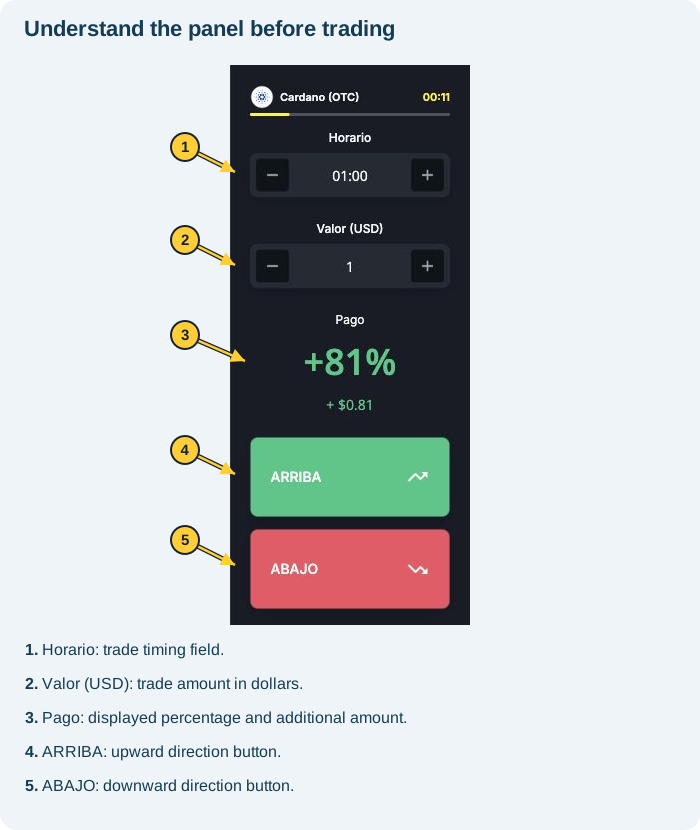
Review before deciding
- Account: demo or real?
- Asset: does the name match the instrument you intended to select?
- Amount: is the entered amount correct?
- Time: which option is selected under Horario?
- Payout: which percentage and additional amount are displayed?
Filling in the fields is not the same as completing a trade. ARRIBA (Up) and ABAJO (Down) are used to submit trades; do not use them just to test how the screen works.
The field will not accept the amount or time
Read the message, check the option available for the asset and avoid repeated clicks without understanding their effect. If there is no clear guidance, contact support with the asset, field and notice displayed.
See also what the buttons and percentage mean and chart periods.
Why does the opening time show :00 seconds?
The displayed time identifies the reference candle's minute, not the exact second you clicked. Entries up to the 30-second mark belong to the same candle; entries after that point belong to the next one. Check the closing time for the selected setup. See the examples and distinction between time and price in how entry times, the 30-second rule and closing work.