
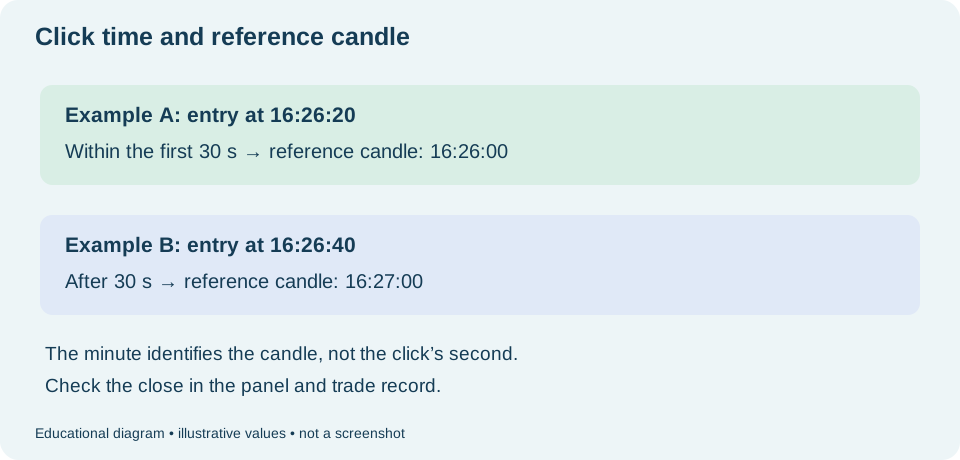
History may show :00 seconds even if you clicked a few seconds later. On Worbit, the record identifies the reference candle's minute, not the exact second of your click.
Understand the entry window
- Up to 30 seconds: entry belongs to the same reference candle.
- After 30 seconds: entry belongs to the next candle.
Moving to the next reference candle changes the minute shown in the record. Avoid basing an entry on the exact transition instant: check the counter and platform information.
Review the observed case
In the documented test, submission occurred after 16:26:26. History showed opening at 16:26:00 and closing at 16:27:00. The :00 opening represents the candle's minute; it does not mean you clicked 26 seconds earlier.
Do not confuse time with price: this format does not mean you should calculate the result using the candle's opening price. Check the prices in the trade details, as explained in why a green candle does not mean you won.
Distinguish the controls
| Information | What to observe |
|---|---|
| Período de vela (Candle period) | Time summarised by each chart candle. |
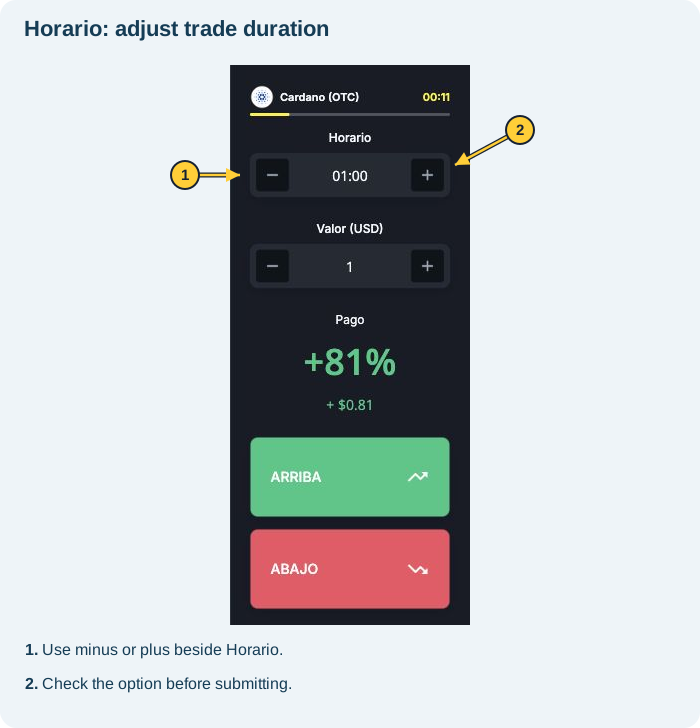
| Horario (Time) | Trade timing setting. Check before submitting. |
| Panel/chart counters | Ongoing time references. Do not assume they all measure the same thing. |
| History opening and closing times | The trade's time record; opening uses the reference candle's minute. |
What to check before and after
- Before submitting, confirm the asset, intended direction, amount and Horario.
- Observe the available time and entry-window transition.
- After submitting, track the trade and check its recorded close.
- When reviewing, compare times within the same time zone displayed by the platform.
Do not assume every Horario value always counts like an exact stopwatch from your click. The example describes the documented window; check the displayed close for your setup. An open trade cannot be cancelled.
See also: amount and timing · history and results · trade cancellation · candle period and trade timing.