
You enter a coupon while preparing your deposit. Before paying, check that the platform accepted the code and read the conditions displayed.
Find the coupon field
- Open Billetera / Cartera → Depósitos (Wallet → Deposits).
- Choose a method available for your account. Methods may vary by country.
- At the form or review step, find Cupón de bono (Bonus coupon).
- Enter the code you received in the promotion and select Aplicar (Apply).
- Wait for the result before continuing.
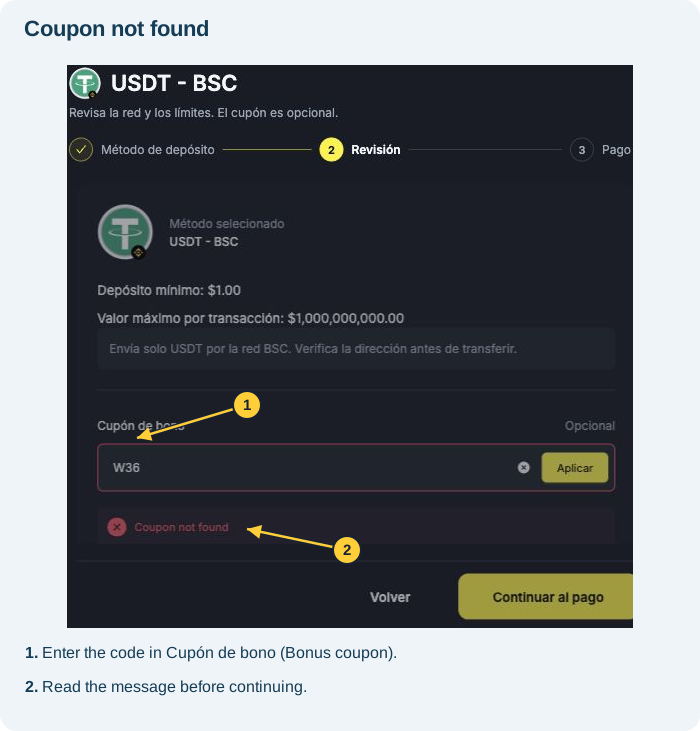
The example uses USDT - BSC, which displays the coupon at the Revisión (Review) step. Other methods may have different fields.
If “Coupon not found” appears
This means the coupon was not found. The screenshot shows this message for an unrecognised code. Check the spelling, remove extra spaces and make sure you are using the code from the correct promotion. This message does not confirm a payment failure.
How to tell whether it was accepted
When a coupon is accepted, the interface shows Aplicado (Applied) and displays the terms. This confirms that the coupon was validated in the form; it does not mean the deposit has been paid or the bonus has already been credited.
Read the conditions before continuing
Each coupon can be used only once. There are first-deposit campaigns and other offers with their own conditions. Check your eligibility before paying.
Check the promotion's minimum deposit, bonus limit, percentage and conditions for use and withdrawal. The payment method's minimum may differ from the coupon's required minimum.
Rollover is always calculated using deposit + bonus, multiplied by the campaign's rollover factor. Check the multiplier in the offer's conditions before calculating the required volume. See how to calculate and track rollover. If an offer's wording is unclear, ask support for clarification before activating it.
Check the coupons advertised in current campaigns; this tutorial does not guarantee that a promotion is available or that you qualify. To understand cancellation and its consequences, see how to check or cancel an active bonus.
Is the code still being rejected?
Tell support the coupon, exact message, selected method and promotion where you received the code. Check the offer's rules on expiry, amount and eligible users. Do not make repeated deposits to try to fix a coupon error.
See how to open in-platform support. If you cannot sign in to the platform, use support@worbit.io.