
Closing an account is different from signing out. Before starting, check your balances and requests in progress, and ask what will happen to them.
Check whether you only want to sign out
To sign out, look for Salir (Sign out) in Profile. To close a panel, use its X or Cerrar (Close). Cerrar cuenta (Close account) refers to closing your account; do not use it simply to close a window.
Prepare before requesting closure
- Check your balances in Finanzas (Finances).
- Check deposits and withdrawals in Cartera → Historial (Wallet → History).
- Review active bonuses and their conditions.
- Save any receipts and records you need.
- Ask support how to resolve outstanding funds or pending requests before closing.
Do not assume account closure automatically makes a withdrawal or transfers a bonus. To cancel a bonus, read the specific consequences.
Find the account option
- Open Perfil (Profile).
- Go to Cuenta (Account).
- Find Cerrar cuenta (Close account).
- Before continuing, confirm the closure conditions, treatment of outstanding funds and possibility of future recovery with support.
Read any notice in full and proceed only if it matches your intention. If the option is unavailable, ask official support for guidance.
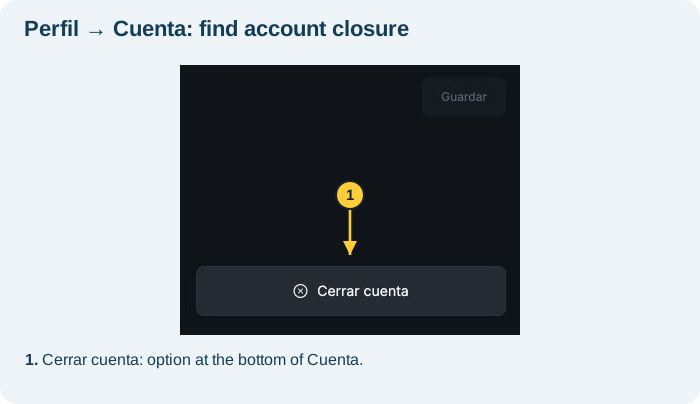
In the screenshot: Cerrar cuenta is at the bottom of Cuenta, below the account fields. The crop shows only the lower section to protect account details.
To sign out only, return to Profile and use Salir. Do not select Cerrar cuenta for that purpose.
Read the confirmation before deciding
- In Cuenta, select Cerrar cuenta.
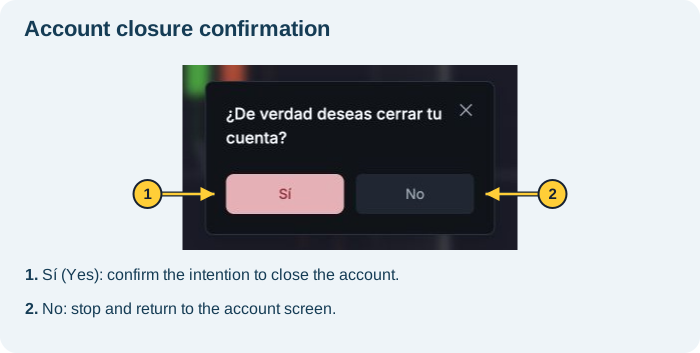
- The platform asks ¿De verdad deseas cerrar tu cuenta? (Do you really want to close your account?).
- To stop and keep your account open, select No.
- To confirm closure, the displayed option is Sí (Yes). First check the balances, pending requests and support guidance described above.
Opening this window alone does not close your account. Do not click Sí if you only want to sign out.
How do I check completion?
Ask for explicit confirmation that closure is complete and keep the support record. Being unable to sign in may have other causes and does not, by itself, prove account closure.
If you also want to request deletion of personal data, raise that separately with support and consult the privacy policy. Do not assume that closing access immediately deletes all records.
If needed, see how to contact in-platform support. Without platform access, email support@worbit.io.