
Weekly qualification requires two targets together: eligible deposits and eligible trades. The achieved level takes effect the following week. Viewing a VIP card does not activate its benefits.
Check the targets
| Platform level | Weekly deposits | Weekly trades |
|---|---|---|
| Bronce — Bronze | 2 | 100 |
| Plata — Silver | 3 | 100 |
| Oro — Gold | 4 | 100 |
| Diamante — Diamond | 5 | 100 |
For this route, each deposit must be eligible, approved and at least 10 USD. Trades must also meet the criteria in the eligible-activity guide. A raw transaction count or account balance is not enough.
Understand the calendar
The VIP week runs from Saturday at 00:00 to Friday at 23:59:59, Caracas time (UTC−4). You receive the highest level for which both targets are met; activation is the following week. Check the time zone before comparing with your device clock.
Example: 100 eligible trades and three eligible 10 USD deposits in the same week meet Silver targets. Three deposits without the 100 trades do not meet this route. Diamond has special conditions explained in its guide.
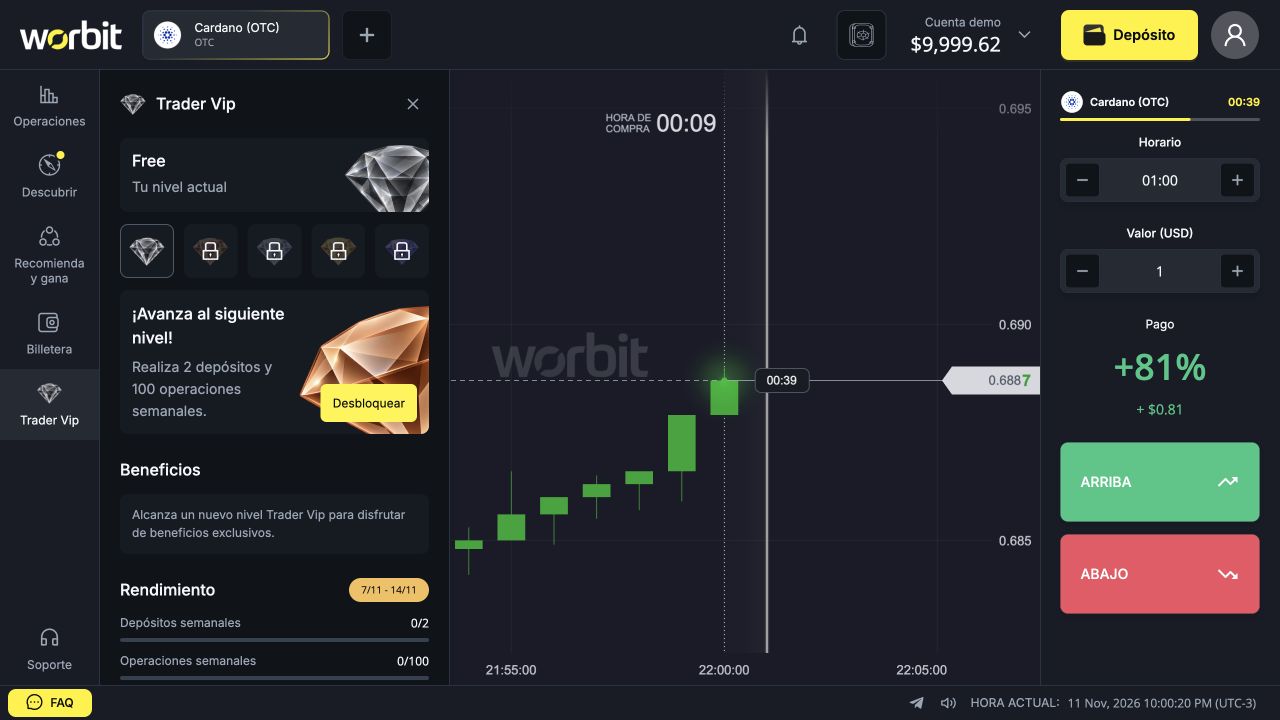
Track progress in the platform
- Open Trader Vip in the menu.
- Check Tu nivel actual (Your current level).
- Select a card to read targets and benefits.
- Under Rendimiento (Performance), check counters and the displayed period.
Is the level permanent?
No. You must qualify again for weekly renewal. Depending on eligible activity, you may keep, increase or drop your level, or have no VIP status. Do not confuse this with Rewards chest levels.
Do not increase deposits or trades simply to chase a benefit: VIP does not eliminate losses. If the expected level is missing after the weekly change, gather the period and records and ask support.
See also: VIP level and benefits · VIP level not updated · eligible deposits and trades · special Diamond access.
Reference: official VIP rules, consulted on 11 November 2026.