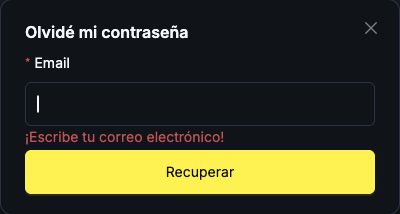
You can start recovery using the email address registered with Worbit. Before you begin, check that you can open that inbox.
If you are signed out
- Go to the official website and select Entrar (Sign in).
- On the sign-in page, select ¿Olvidaste tu contraseña? (Forgot your password?).
- Enter the email address you used to register and follow the instructions to request recovery.
- Open the message matching your request and follow the instructions to set a new password.
- Return to the official sign-in page and try signing in with your new password.
If you are still signed in
Open Perfil → Seguridad → Olvidé mi contraseña (Profile → Security → I forgot my password). In the recovery window, check the Email field and select Recuperar (Recover) when you want to request the instructions.
Choose a password you use only for Worbit. Do not share your password or the recovery link.
Has the email not arrived, or have you lost access to it?
If you can still open your inbox, see what to check when an email does not arrive. If you have lost access to the email account itself, try recovering it through your email provider. If you cannot, ask Worbit support for guidance at support@worbit.io.
Password recovery and Google Authenticator recovery are separate processes. If the problem is with your authenticator code, see what to do if you have lost access to Google Authenticator.