
Worbit gives you a place to recommend the platform to friends and earn rewards for referrals that meet campaign conditions. With Recomienda y gana (Refer and earn), share your link, track missions and check rewards in one place.
Start by finding your link: it identifies your account as the invitation’s source.
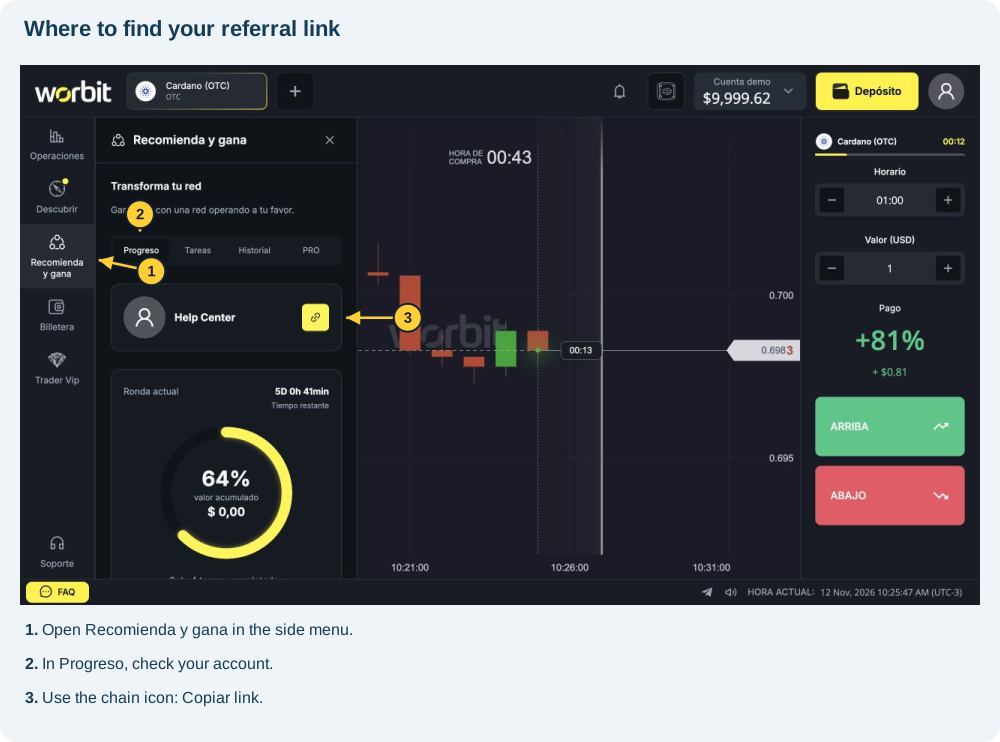
Open referrals
- Sign in to your account.
- Select Recomienda y gana in the side menu; in compact navigation, look under Navegación.
- If ¿Cómo funciona Invita y Gana? (How does Invite and Earn work?) appears, read and close the introduction.
- Select Progreso.
Copy your link
- Beside your name, find the yellow chain-icon button labelled Copiar link (Copy link).
- A larger Copiar link button appears further down.
- Select it and paste where you are preparing the invitation.
- Check the full address. Preserve all characters and the ending.
If nothing pastes, return and copy again. Avoid replacing it with the browser address-bar URL.
Guide your friend
Share the link and ask your friend to register through it. Explain current missions and required actions. Rewards depend on conditions; sending an invitation alone does not generate payment.
If they already have an account, ask support about attribution. Do not ask them to create another: only one account per document is allowed.
Follow progress
Return to Progreso and check amounts under Historial (History). Review Tareas for every new campaign; previous missions do not automatically apply. For an unrecognised link, see referral troubleshooting.
See also: one account per document · tracking referrals and rewards · tasks and rounds · unrecognised referrals.
Source: Recomienda y gana panel, consulted on 12 November 2026.
Which wallet receives the reward?
Once conditions are met and the reward is released, you can claim it into the real wallet. You can then request withdrawal whenever you wish, subject to confirmed email, approved KYC, active Google Authenticator, withdrawal limits and fee, and any active bonus.
Por liberar (Awaiting release) does not mean claimed. Check release and credit before withdrawing. See how to withdraw.