
VIP cashback is an incentive for traders who finish the week without a positive result from eligible trades. When the result is negative, it returns part of that amount according to VIP level and programme rules. A break-even or positive week produces no cashback.
Separate three figures
- Weekly result: eligible gains and losses are combined. A negative total is the eligible net loss, used as the cashback reference.
- Eligible weekly deposits: cap the calculation base.
- Current percentage: Bronze 5%, Silver 10%, Gold 15% and Diamond 20%.
Examples
| Illustrative situation | Base | Cashback |
|---|---|---|
| Diamond: net loss 200 USD; deposits 100 USD | 100 USD | 100 × 20% = 20 USD |
| Silver: net loss 40 USD; deposits 100 USD | 40 USD | 40 × 10% = 4 USD |
| Gold: no net loss; deposits 100 USD | Zero | Zero |
| Diamond: net loss 80 USD; no eligible deposits | Zero | Zero |
If eligible trades produce 70 USD in negative results and 30 USD in gains, the gains offset part of the losses, leaving 40 USD. That difference enters the calculation, subject to the deposit cap and percentage. Also see the difference between profit and total return.
Can deposits below 10 USD count?
The public rule allows them in the cashback cap. This does not make them eligible for the weekly VIP deposit-count target, which has a different criterion.
Where can I check the available amount?
- Select Trader Vip in the side menu.
- Scroll to Cashback.
- Check Valor disponible (Available amount).
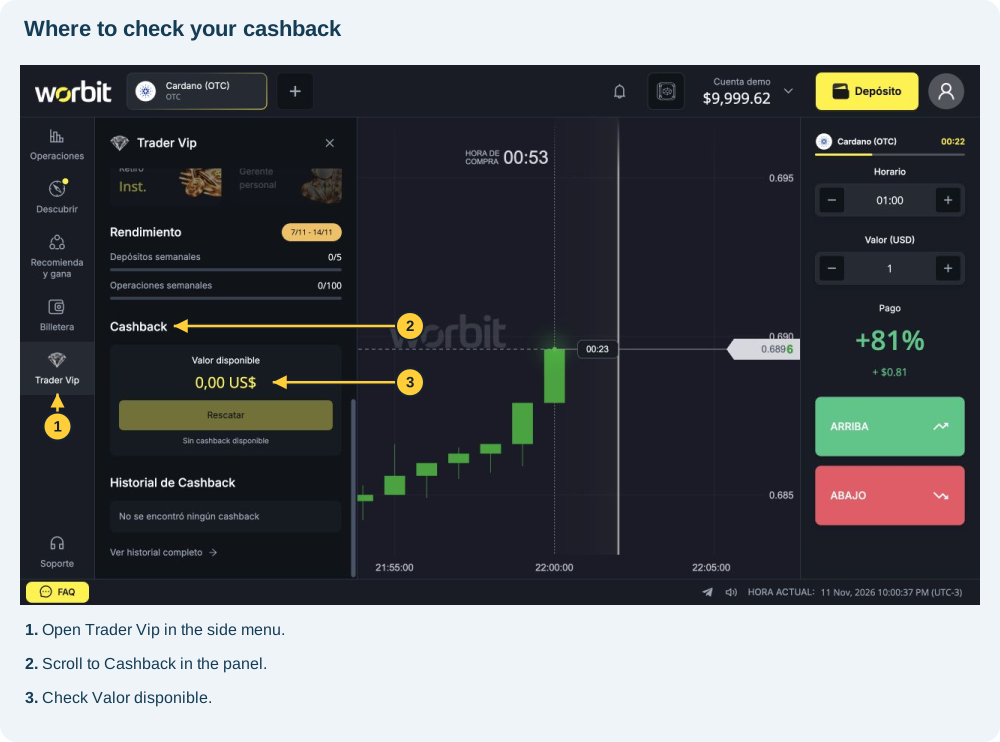
The image shows 0,00 US$ and locates the benefit. To check your calculation, compare period, eligible results, deposits and current level. Opening another level’s card only displays its benefits.
For help, give support the period and records. Cashback returns only part of an eligible negative result; it does not guarantee full recovery. See how and when to claim.
See also: claiming and checking cashback · balance types · investment, profit and return · eligible VIP activity.
Reference: VIP rules, consulted on 11 November 2026.
When to claim: Saturday only, within the programme window. See timing and steps.