
Claim eligible cashback on the following Saturday, between 00:00 and 23:59:59, Caracas time (UTC−4). The published rule states that unclaimed cashback does not automatically accumulate beyond this window.
Check the correct window
Use Caracas time. Do not assume your device’s Saturday starts and ends at the same times. Check the benefit period and current level before comparing amounts.
Find the claim control
- Open Trader Vip.
- Scroll to Cashback.
- Check Valor disponible (Available amount) and the adjacent message.
- If an eligible amount exists and Rescatar (Claim) is enabled within the window, select it and follow the instructions.
- Check the response and credit before treating it as complete.
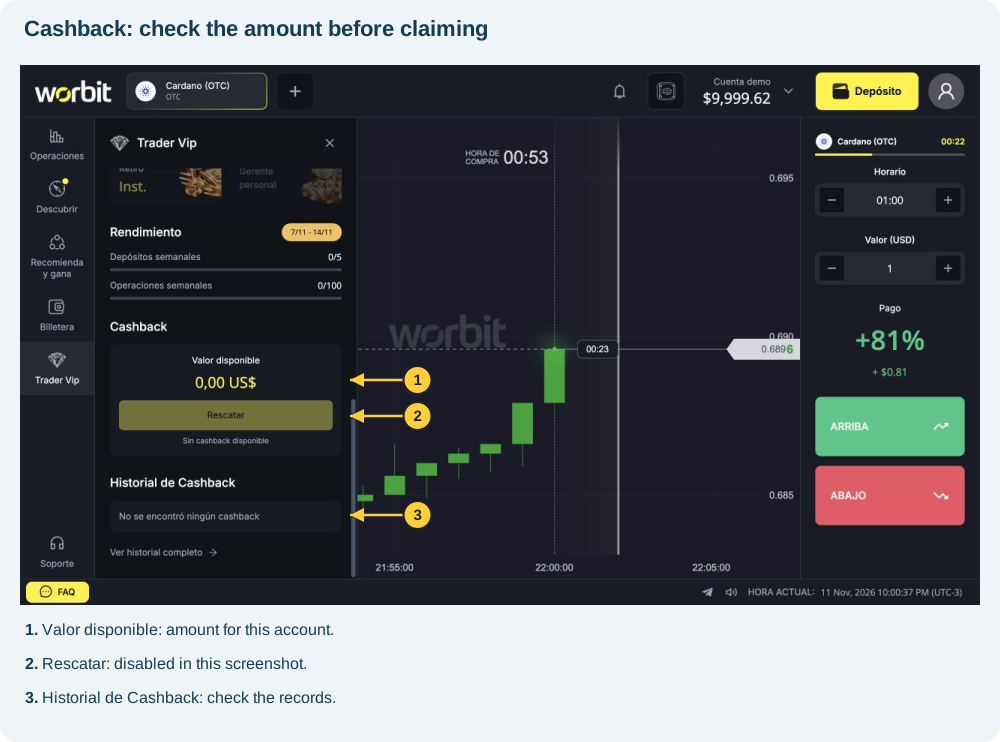
The screenshot shows 0,00 US$, Sin cashback disponible (No cashback available) and a disabled button. It locates the benefit, not a successful claim. Do not repeat clicks or deposits to enable it.
Which balance receives it?
The rules specify real funds with no rollover: no trading-volume requirement is attached to this credit. General withdrawal requirements still apply, including confirmed email, approved KYC and active 2FA.
How can I track it?
Check Historial de Cashback (Cashback history) and the real balance. If a shortcut opens trades, those records do not prove a cashback credit. Ask support for the posting identifier if needed.
The amount is missing or the button remains disabled
Check eligible net loss and deposits, the claim window and your account’s level. Give support the period, expected amount and displayed message. Ask for the timeframe applicable to your case.
See also: making a withdrawal · cashback calculation.
Reference: VIP rules, consulted on 11 November 2026.
Sin cashback disponible means no amount is available to claim at that moment. See the calculation base and percentage. Cashback, Rewards prizes and referral rewards follow different rules.