
A legible image helps the team check your details. Prepare photos before uploading and check what was requested: a document photo and a selfie holding the document are different materials.
Prepare the document and surroundings
- Use a document accepted for your account that belongs to you.
- Place it on a flat, well-lit surface.
- Avoid glare, shadows over text and objects covering information.
- Include every edge and keep the camera steady.
- Enlarge the photo: name, number and other details must be legible.
Do not alter details, apply appearance-changing filters or cover information needed for verification. If compression makes text unreadable, retake the image rather than repeatedly using the same file.
Separate front and back
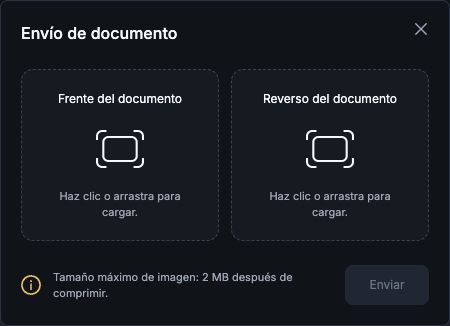
Under Perfil → Verificación de identidad → Validación de documento → Enviar foto del documento (Profile → Identity verification → Document validation → Send document photo), the window shows Frente del documento (Front) and Reverso del documento (Back). Put each side in its correct field and review before submitting. The stated limit is 2 MB per image after compression.
When is a selfie needed?
In the confirmed Google Authenticator recovery process, a logged-in user verifies identity through official chat with a selfie holding the document. This does not mean every initial KYC submission requires a selfie.
When support requests it, keep your face and document visible and follow the agent’s framing instructions. Do not use another person’s photo or send this material to group contacts or unverified profiles. Do not add gestures, papers or details that were not requested.
Before finishing
- Check that you selected the correct file.
- Check that both sides belong to the same document.
- Read the confirmation or error message.
- If rejected, check the reason before resubmitting.
Do not send documents in chat simply to “speed up” a review: follow the process specified for your case. See the guide to official channels and avoiding scams.
See also: identity verification · rejected documents · Google Authenticator recovery · identifying official channels.