
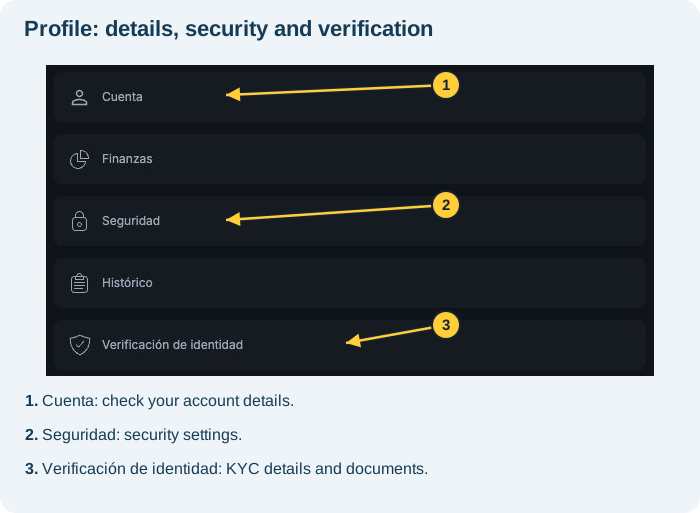
Perfil (Profile) brings together account options. You can check your registered details and find the language selector without opening the payments area.
Open your profile
- In the wider layout, select the user icon in the upper-right corner.
- In compact navigation, select Perfil (Profile) in the bottom menu.
- Review the available sections before choosing what to view.
Find the language setting
- In Profile, scroll to Idioma de la plataforma (Platform language).
- Check the options ENG (English), ESP (Spanish) and PT (Portuguese).
- Select your preferred language when the control is available.
- Check the menu names after the interface updates.
You may need to wait for loading to finish before the controls become available. If they do not respond or part of the interface remains in another language, tell support which area differs.
Interface language is different from your registered nationality. Payment methods depend on account conditions, including country; changing the language does not change those registered details.
Check your account details
- Within Profile, select Cuenta (Account).
- Check the displayed fields. The recorded session showed Apodo (Nickname) and Email.
- The email field was locked for editing. If you need to correct a detail you cannot edit, contact in-platform support.
- If you change an editable field, review it and use Guardar (Save) when available. Check the confirmation before leaving.
Apodo is the nickname field in this section. It does not replace the name or documents used for identity verification.
I need to correct my KYC details
See Perfil → Verificación de identidad (Profile → Identity verification). To correct personal details, contact support and complete the requested identity check, as explained in how to correct inaccurate personal details. If there was a rejection, also check the stated reason. Changing a nickname does not automatically correct document details.
I cannot access my registered email
Try recovering the mailbox through your email provider and contact Worbit support. Do not create another account to work around the issue. See also password recovery.
Check the button carefully: Cerrar cuenta (Close account) is different from closing a panel. To leave only the viewing window, use the panel's X or Cerrar (Close), without selecting account closure.