
You can use your national identity document or passport for KYC. The document must belong to the account holder. Check the platform’s submission option before choosing a file.
Check your account’s option
- Open Perfil → Verificación de identidad (Profile → Identity verification).
- Expand Validación de documento (Document validation).
- Check Tipo de documento (Document type) and Número de documentación (Document number).
- If the option does not make clear which document to use, ask internal support, stating your registered country and the option’s name.
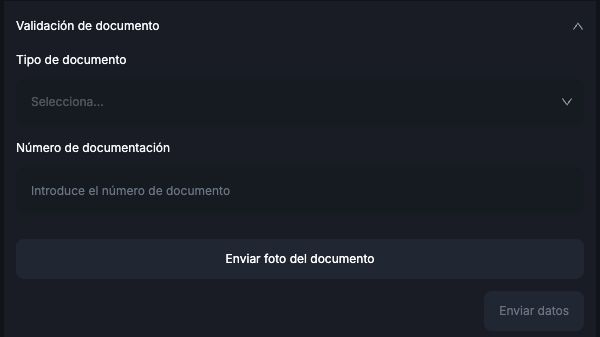
The Colombian account reviewed displayed ID. Worbit accepts a national identity document or passport. If the selector does not clearly show the matching option, ask for guidance before submitting; do not choose another type just to continue.
What should you check?
- The document belongs to the account holder.
- The entered number matches the photographed document.
- Details are legible and images show the requested sides.
- If you are unsure whether your document is valid or whether a digital, provisional or foreign document is accepted, ask support before submitting it.
The observed upload window has separate front and back fields. For a passport, follow support’s instructions about the page and fields to use; do not assume you should duplicate the same image. The screen states up to 2 MB per image after compression. See how to complete KYC.
Can more documents be requested?
The public policy allows requests for additional information and documents, including proof of address and payment-method details. This does not mean you must send every item without being asked. Follow the specific request through the official process.
See the KYC / AML Policy. Identity review may take up to 72 hours; submission does not mean approval. To withdraw, you need approved KYC, a confirmed email address and active Google Authenticator.
See also: identity verification · rejected documents · KYC pending for over 72 hours · preparing document photos and a selfie.